Bitcoin Ethereum Crypto Trading Bot - How to Use Guide
0. Getting Started with Auto Trading
To use the automated trading system, follow these steps:
- 1) Create a Coinbase account:
Create an account at Coinbase Advanced Trading and complete verification. (Advanced is required for API access.)
Open Coinbase Account → - 2) Deposit funds:
Deposit initial funds to your Coinbase account for automated trading.
Note: ai Swing X™ does not directly deposit, withdraw, or custody customer funds. All assets are traded only within the user's own account. - 3) API key creation & registration:
Follow the Coinbase API Setup section below to create API keys and register them with this service.
Once the above steps are complete, you can safely start the automated trading system.
1. Dashboard
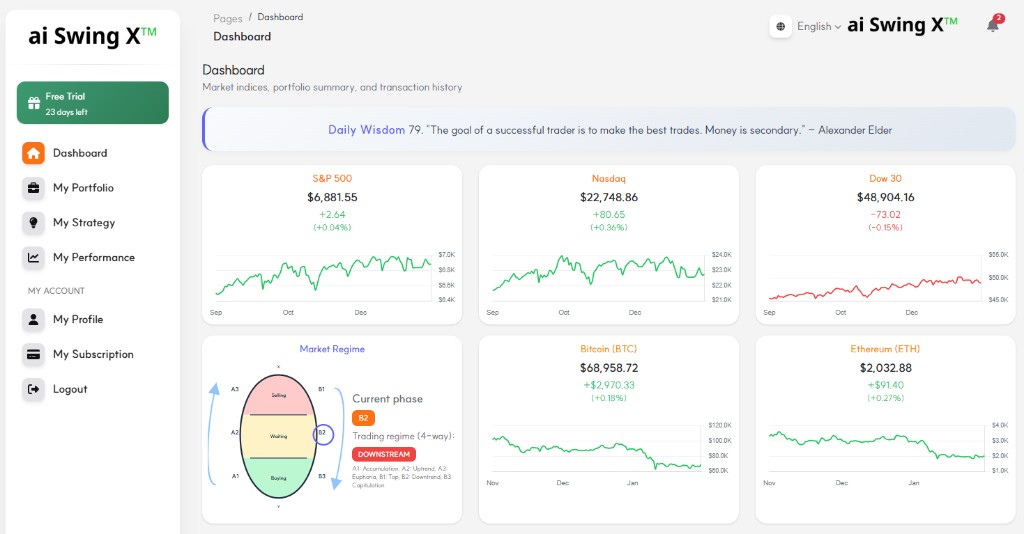
The dashboard displays major indices (S&P 500, Nasdaq, Dow Jones) visually:
- Daily index: Updated around 4:00 PM each business day (closing price)
- Real-time index: Auto-refreshed every 10 min, keeps last 48 bars (~8 hours)
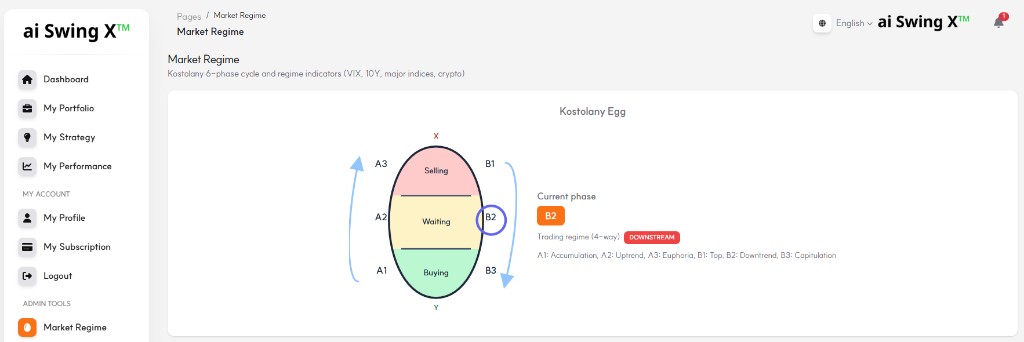
Market Regime: The Market Regime card shows the current Kostolany phase (A1–B3) and the 4-way trading regime (UPSTREAM, DOWNSTREAM, CAUTION, NEUTRAL), so you can align your strategy with market conditions.
You can also view holdings, returns, available order amount, and Transaction History (Weekly/Monthly/All).
2. My Portfolio
Register your crypto holdings and set automated trading. Link a strategy to each coin and enable Auto Trading ON so orders follow the strategy up to 90% automatically.
Key registration info:
- Exchange: e.g. Coinbase
- Strategy: Select from registered strategies
- Auto Trading: ON/OFF
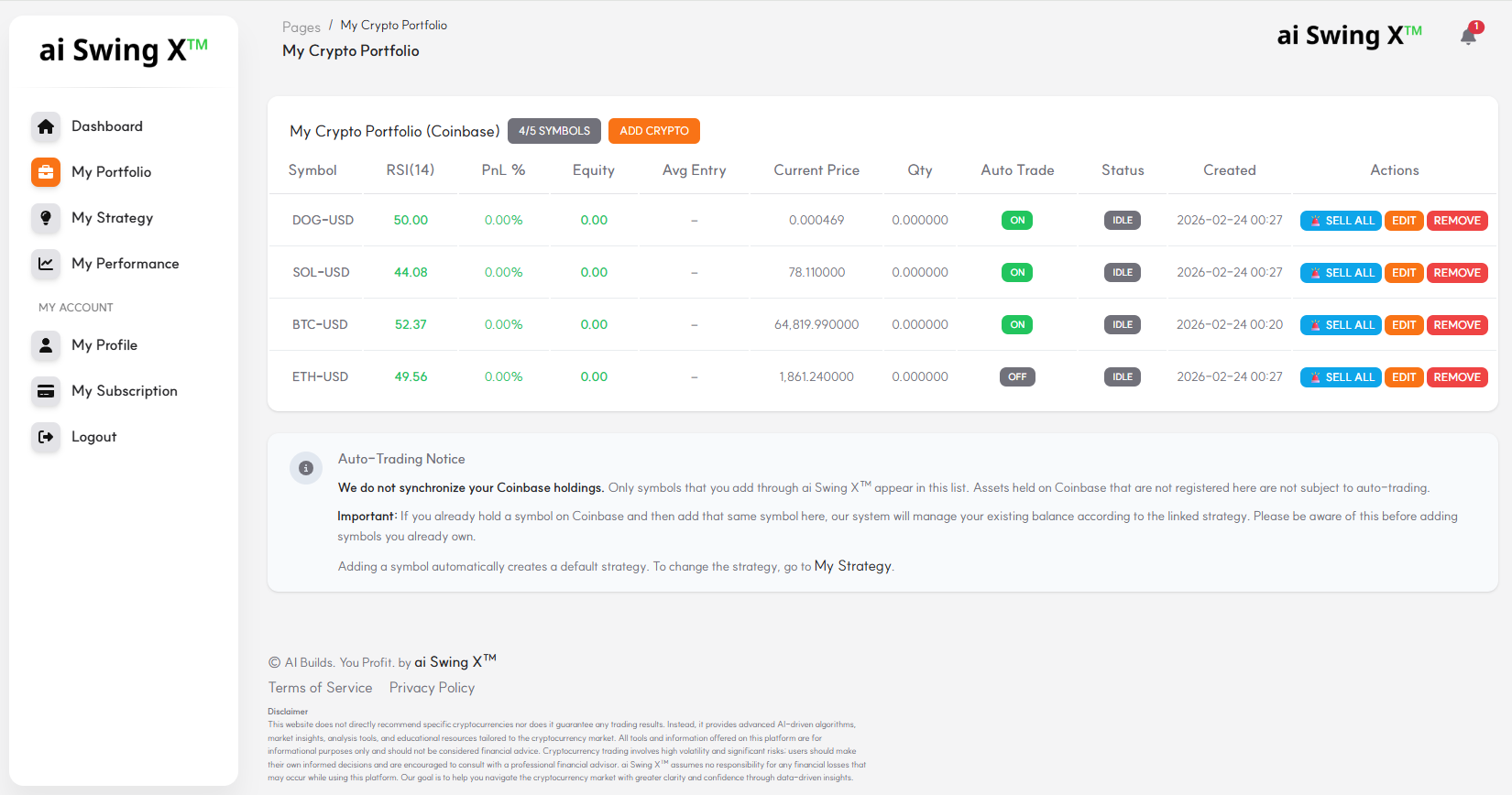
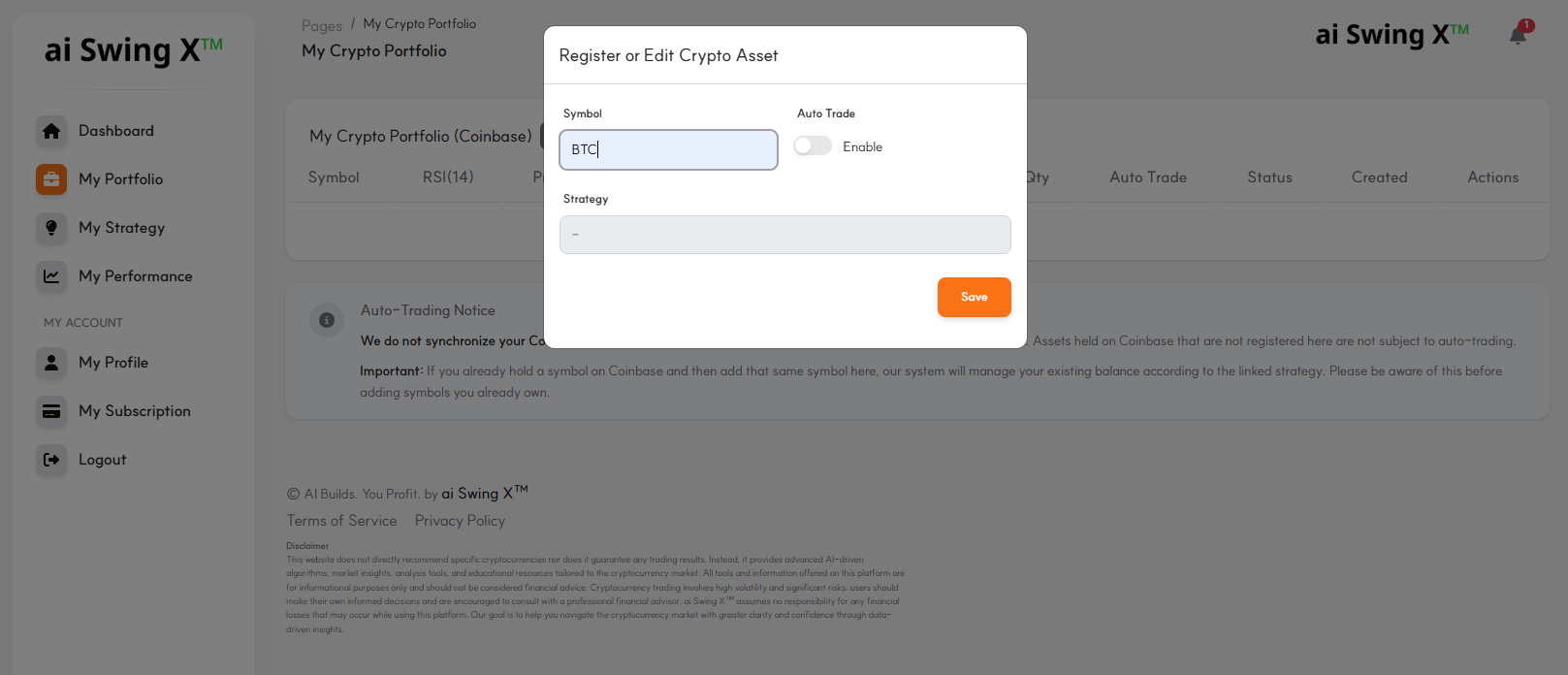
Add symbols: Use the Add button to register new crypto positions.
3. Strategy Settings
In 'My Strategy' combine RSI, MACD, Bollinger Bands, volume and other indicators to create your own trading strategy. Register multiple strategies and link them to your portfolio.
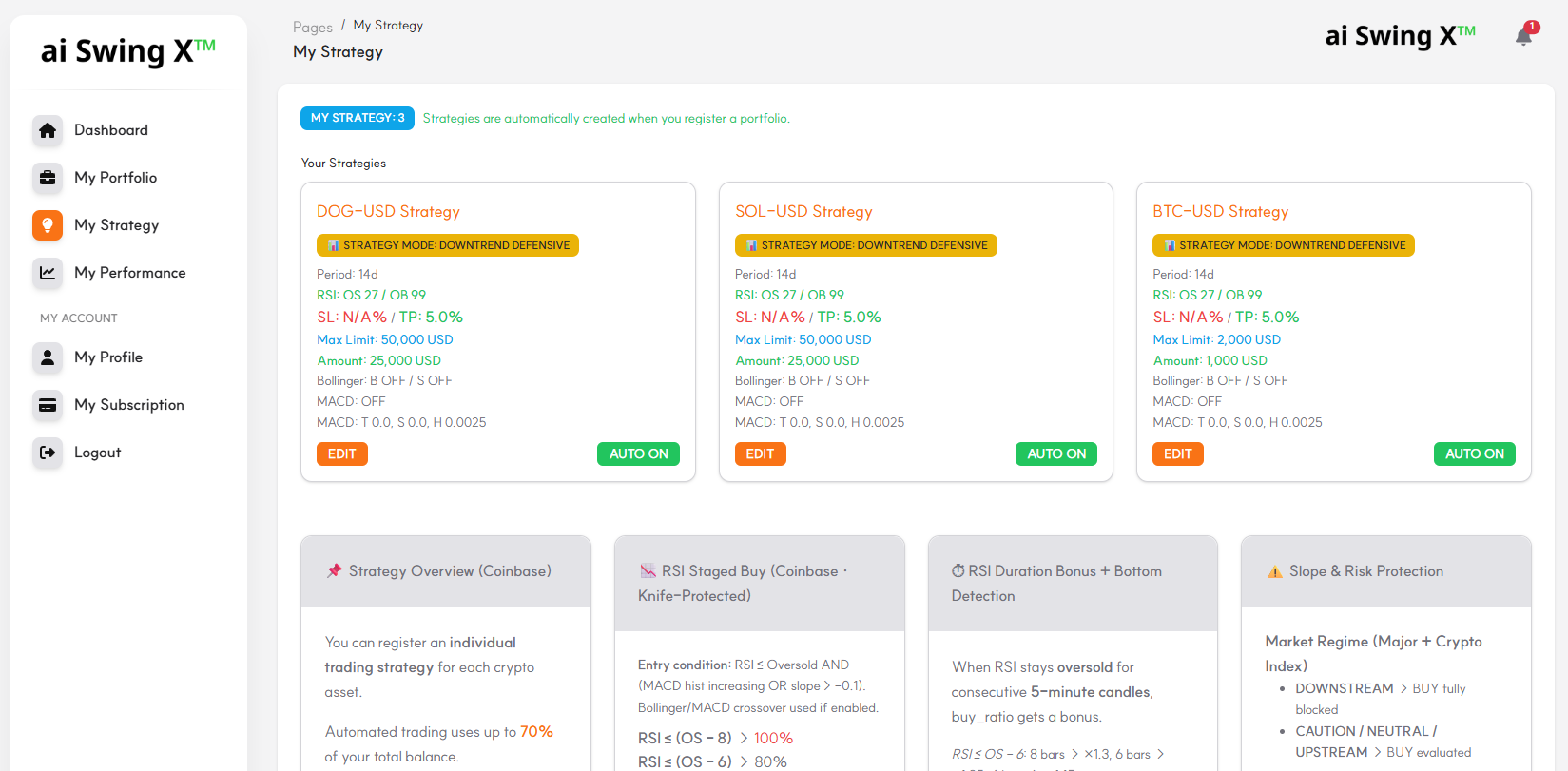
Edit strategy: Click Edit to adjust RSI, MACD, Bollinger Bands, and other parameters.
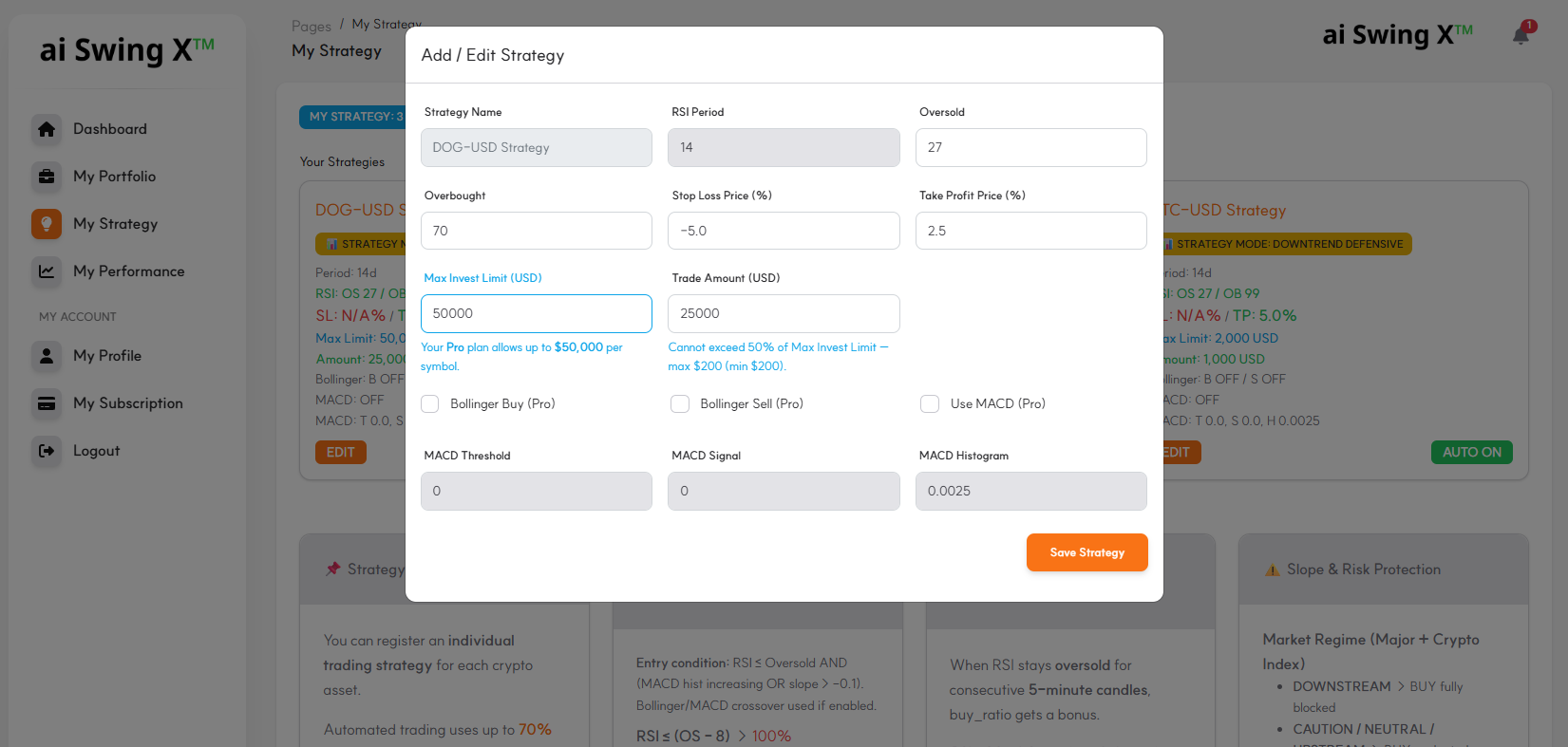
4. Detailed Strategy Guide
Detailed explanation of each strategy component for effective setup and understanding.
📤 Buy/Sell: TP & SL = always full sell. RSI OB / MACD sell = full if position <$300, else 50% partial.
Strategy Components Summary
- RSI thresholds: (oversold_threshold, overbought_threshold)
- Bollinger Band usage: (use_bollinger_buy, use_bollinger_sell)
- MACD usage: (use_macd, macd_histogram_threshold)
- Stop Loss & Take Profit: (stop_loss, take_profit)
- Market trend detection: (upstream_threshold_percent, downstream_threshold_percent)
🚩 RSI-based Trading Signals
RSI indicates whether price is overbought (high) or oversold (low). (0~100 range)
- Oversold (oversold_threshold): Buy signal when RSI ≤ 30 (staged buy_ratio by depth)
- Overbought (overbought_threshold): Sell when RSI ≥ 70 — full sell if position <$300, else 50% partial
🚩 Bollinger Band Signals
Use price volatility; trade when price touches upper or lower band expecting a reversal.
- use_bollinger_buy: Buy when touching lower band
- use_bollinger_sell: Sell when touching upper band
🚩 MACD Settings
Use MACD to identify trend reversal signals for trading.
- use_macd: Enable/disable MACD
- macd_histogram_threshold: Buy signal when MACD histogram turns positive
🚩 Stop Loss & Take Profit
Auto-sell when specified loss or profit level is reached. Both TP and SL execute full-position sell (100% of holdings).
- stop_loss: Loss limit (e.g. -3%) → full sell
- take_profit: Profit target (e.g. 5%) → full sell
🚩 Market (Bull/Bear) Detection
Judge overall market sentiment from major index movement.
- upstream_threshold_percent: Bull market threshold (e.g. 1%+)
- downstream_threshold_percent: Bear market threshold (e.g. -1% or below)
⚙️ Example Strategy Combination
- RSI: 30 (buy), 70 (sell)
- Bollinger Bands: Use for both buy and sell
- MACD: Buy when histogram turns positive
- Stop Loss/Take Profit: -3% / 2%
- Market: Bull (1%+), Bear (-1% or below)
Buy actively in bull markets and limit buying in bear markets for strategic risk management.
📋 Strategy Configuration Examples
Practical setup examples for common strategy goals:
- Take-Profit-only strategy (no Stop Loss): Set Overbought to 99 so RSI-based sell rarely triggers; only Take Profit executes.
- When Overbought threshold is exceeded: Position is automatically split into 2 and sold in 2 partial sell orders.
- When Trade Amount is fully used: The same amount will be bought again when buy conditions are met (e.g. RSI oversold).
- Max buy per symbol: Total position value never exceeds Max Invest Limit; additional buys are blocked once the limit is reached.
5. Coinbase API Setup
To use automated trading, register API keys from Coinbase. Follow these steps:
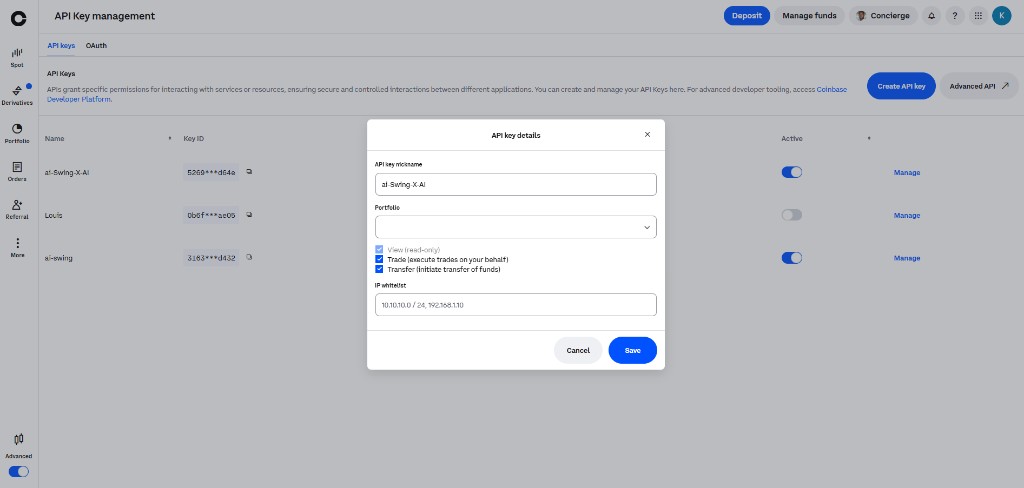
- Log in to Coinbase and create API keys in Settings → API.
- Enable trade and balance permissions. Disable withdrawal for security. IP whitelist can be left empty.
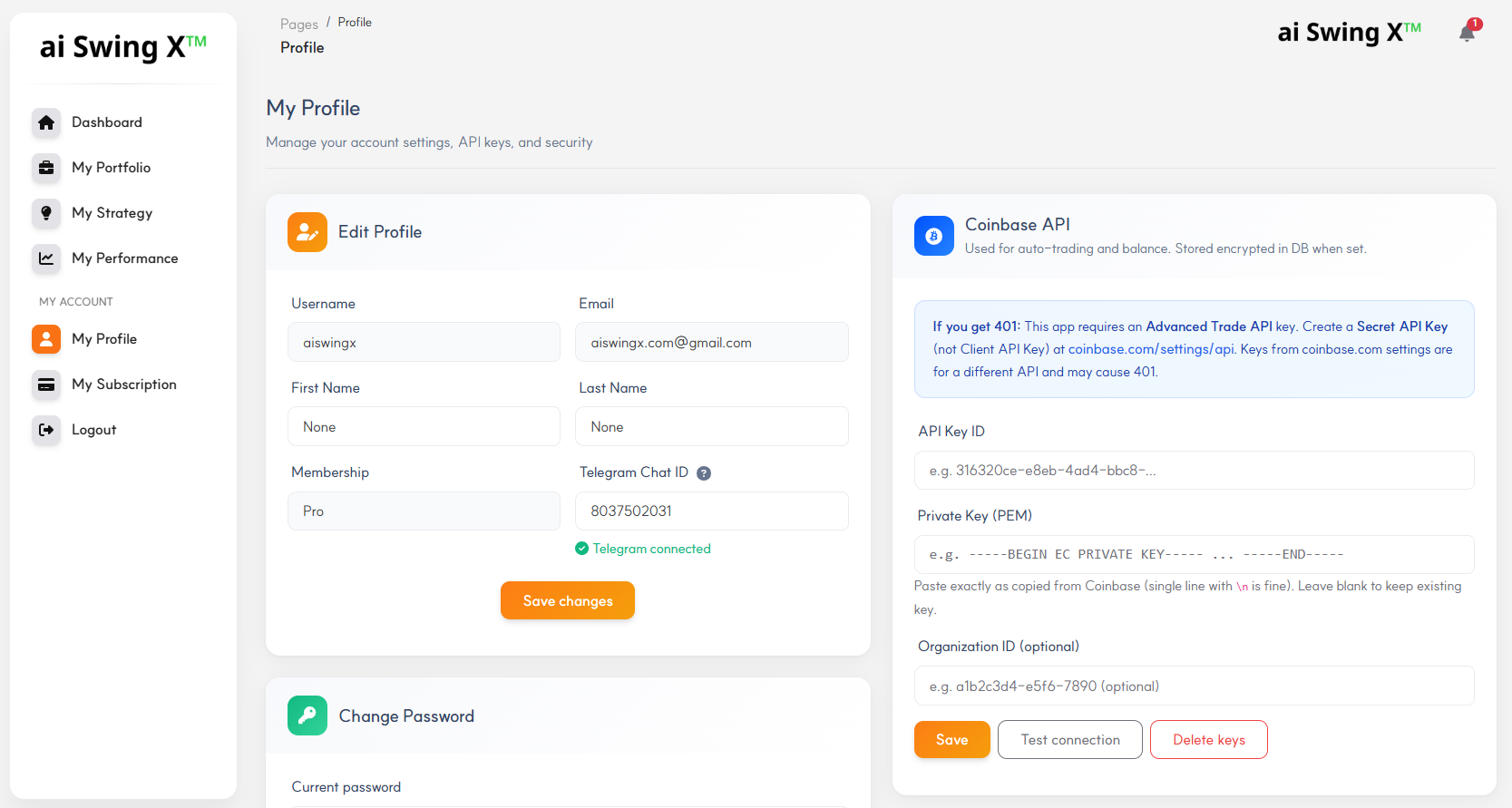
- Register your API keys in the ai Swing X™ Profile page. Keys are encrypted for security.
Go to Profile to enter your Coinbase API Key ID and Private Key:
See Coinbase API documentation for details.
6. Trade Log & Monitoring
All buy/sell/hold commands are logged for transparent tracking. View Transaction History on the Dashboard with Weekly, Monthly, or All filters.
- Trigger: Factor that generated the signal (e.g. RSI, MACD, Bollinger Bands)
- Market State: Market state at execution (bull/bear/neutral)
- Indicator values: RSI, MACD histogram, volume change %, etc.
- Strategy parameters: All settings used (stop loss, take profit, thresholds, etc.)
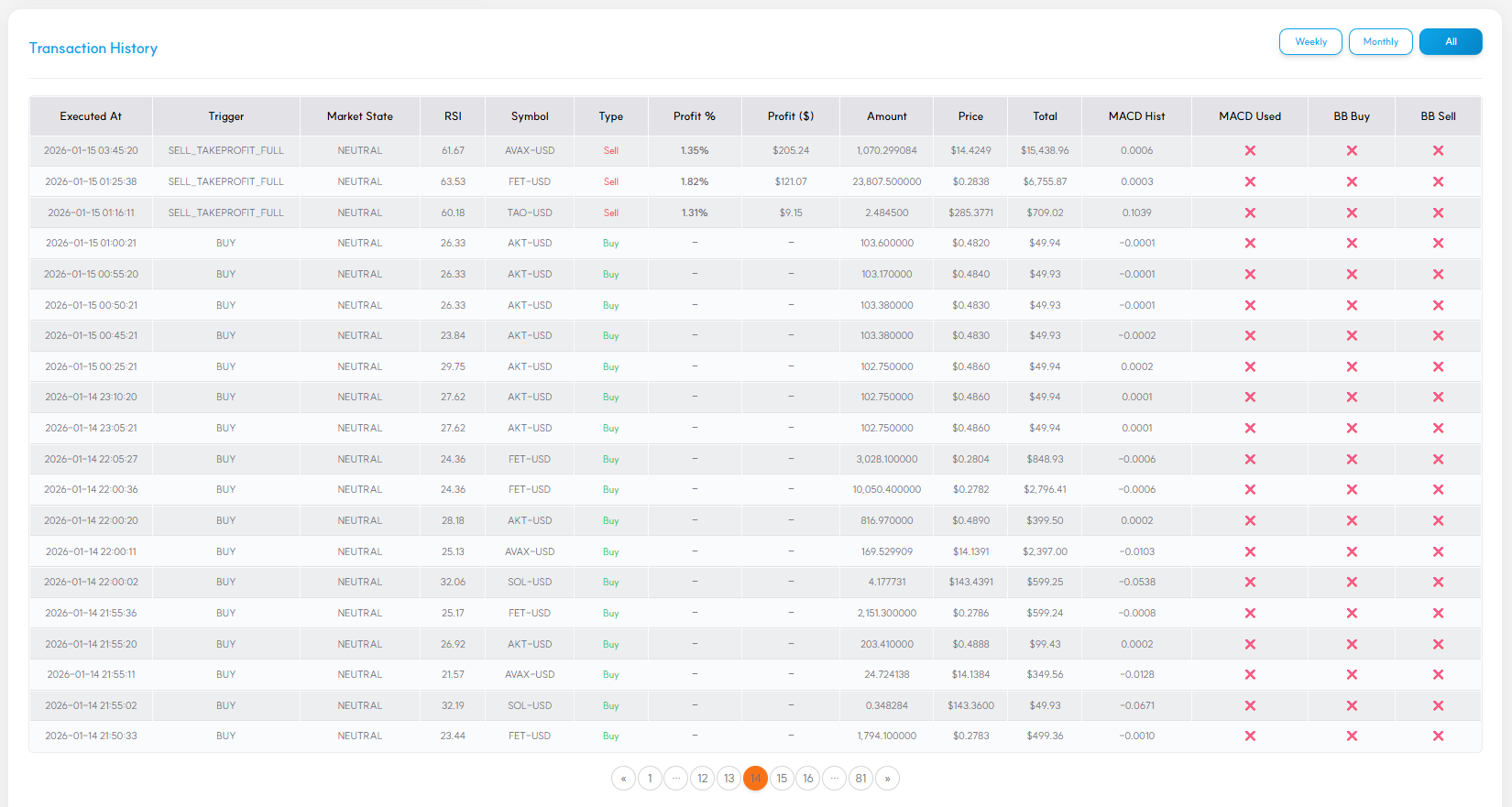
Use these logs to analyze strategy performance and refine as needed.
7. Telegram Alerts & Profile
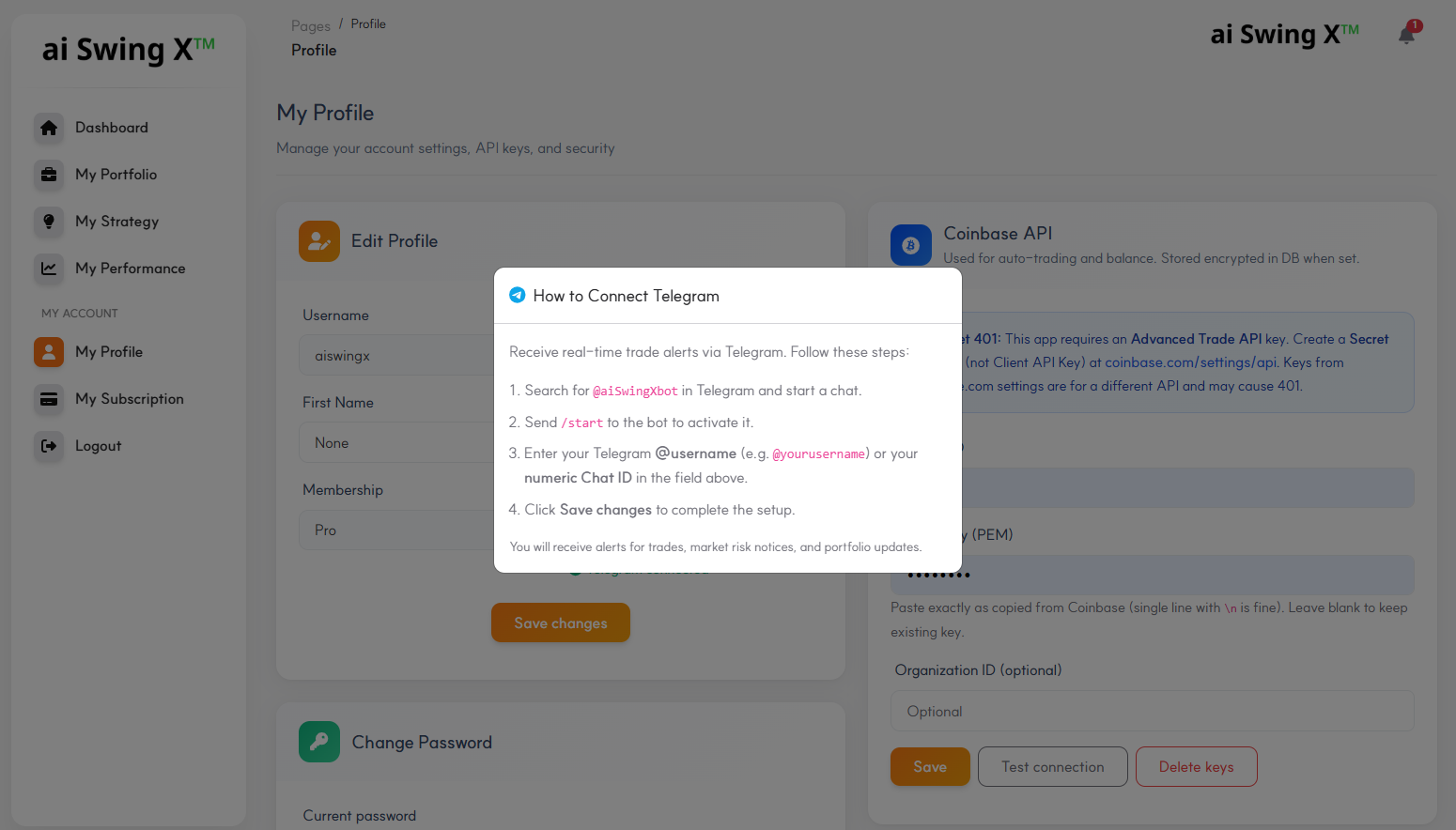
Receive real-time trade alerts via Telegram. Setup:
- Search for
@aiSwingXbotin Telegram and start a chat. - Send
/startto activate the bot. - Register your Telegram username (e.g.
@yourusername) in the ai Swing X™ Profile page. - You will receive real-time alerts for trades and portfolio changes.
Disclaimer: ai Swing X™ is an information platform. Investment is at your own risk.
Register your Telegram username in the Profile page:
Notification Settings
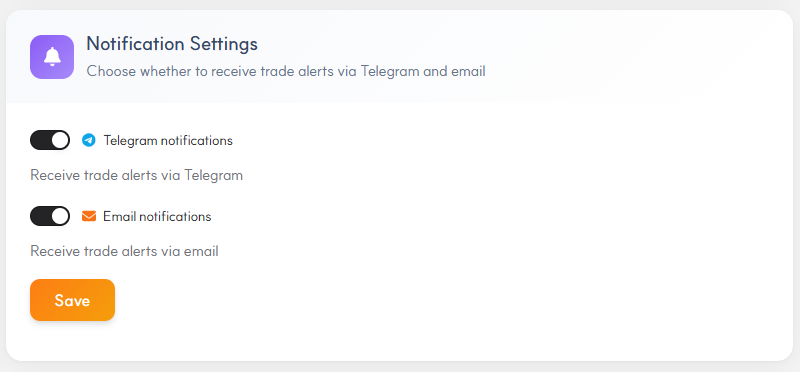
Control whether you receive trade alerts via Telegram and email from the Notification Settings card in your Profile page.
8. USDC Auto Savings 💵
USDC Auto Savings is one of the most powerful features in ai Swing X™. Every week, a portion of your realized trading profits is automatically reinvested into USDC — a stable, dollar-pegged asset — helping you build a safety net while you keep trading.
What is USDC Auto Savings?
USDC (USD Coin) is a stablecoin pegged 1:1 to the US dollar. By automatically saving 10% of your weekly profits into USDC, you are essentially converting volatile crypto gains into stable cash — protecting your profits from market downturns while keeping them ready for future trades.
How does it work?
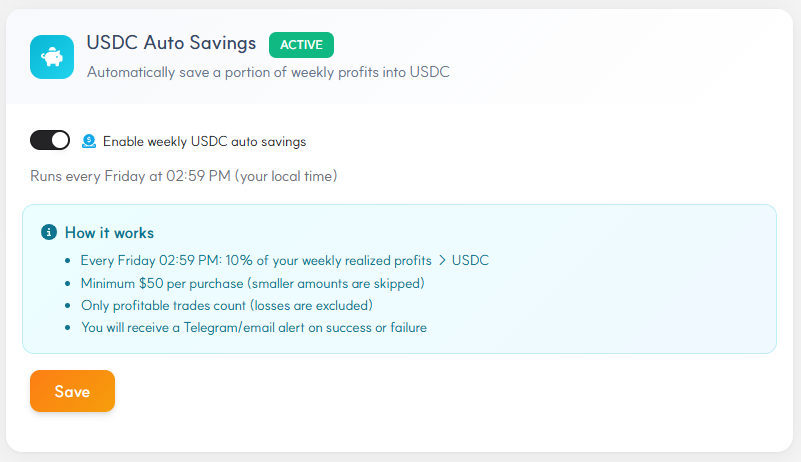
- Every Friday at 2:59 PM Austin time (auto-adjusted to your local time), the system calculates your total realized profits from the past 7 days.
- 10% of those profits is automatically used to purchase USDC on Coinbase.
- Minimum purchase threshold: $50. If your 10% is less than $50, it rolls over to next week.
- Only profitable trades are counted — losses are never included in the calculation.
- You receive instant Telegram and email alerts on every successful or failed purchase.
USDC Auto Savings toggle (Profile page):
Why is this powerful?
- 💰 Automated profit-taking: No need to manually move funds — profits are harvested and secured every week without lifting a finger.
- 🛡️ Downside protection: By converting a portion of gains into USDC, you reduce exposure to sudden market crashes.
- 📈 Compound effect: Over time, your USDC balance grows week after week, creating a powerful buffer and dry powder for future opportunities.
- 🔔 Full transparency: Every transaction is logged and you receive instant alerts — always in control.
9. Support & Contact
For issues or assistance, contact us:
- Email: aiswingx.com@gmail.com
- Chat: Telegram (
@aiSwingXbot)
Investment warning: ai Swing X™ is for information and education. Losses may occur. Invest with care.